How I used LLMs to optimize a SaaS homepage 5x quicker
Accelerate conversion research and A/B tests with LLMs

(This post is part of a series, the first post is here)
Creating an optimized homepage wireframe I can share used to take me weeks, with LLMs it can be done in a day.
When a SaaS company I was consulting with wanted to optimize their homepage for signups I thought LLMs could help with the research and writing a first draft.
In the end, I brought the project from research to a prototype HTML page and was amazed by how much quicker I was using Claude.
Here’s how I turned customer reviews into web copy that’s ready to A/B test.
Synthesising customer research
I’ve run a lot of A/B tests on SaaS home pages. Invariably, the foundation for those winning tests is knowing the user that arrives at the page.
What problem do they want the SaaS to solve? What’s the impact of not solving that problem? What are the benefits of adopting the SaaS? What objections or concerns do they have?
Answer those questions and you have the starting point of a winning test.
Previously, collecting that data meant doing user interviews and tests, talking to sales and support staff, and interviewing the CEO. Work that usually took weeks.
The last homepage test I ran I used Claude (along with some feedback from the CEO) to get answers to these questions in a morning.
1- Summarize reviews from Capterra
Here’s the process I used with Gong (not the actual client) as an example.
I copied hundreds of reviews from Capterra and pasted them into a Google Doc
I connected that doc to a project in Claude and added this text background on the company, the market, their ICP and what I was trying to achieve. Something like this:
I’ve been hired to run an A/B test on the Gong homepage, www.gong.io Gong is a sales intelligence tool for B2B sales and revenue teams. When writing for them: i) use US English ii) focus on clarity, aim for a Flesch-Kincaid grading scale of 7 or lower. Their target user is a sales manager, is tech-savvy but it’s unlikely they have used a tool like Gong before.
I then used these 3 prompts:
1 - What problems does Gong solve for users? Focus specifically on the problems and what life was like before Gong. Rank by most mentioned problems. Include the number of mentions in your answer and use some relevant quotes to support each problem.
2 - Use the exact same format but highlight the top benefits. How users’ lives have improved after Gong.
3 - Use the exact same format but highlight the top objections. What were users’ concerns before buying? What almost stopped them from buying Gong.
See the answers here:
In very little time I’ve got stack ranked customer problems, objections, and benefits alongside real customer language that I can use in my copy.
2 - Use anonymised transcripts from sales calls
The second thing I did was I got access to anonymised transcripts of sales calls and performed the same analysis. (I’m obviously not going to do that for Gong.)
I find the problems and objections are a bit more fleshed out in sales calls. You also have the benefit of cross checking with the reviews — seeing the same stuff on both lists gives you confidence you’ve got the right insights.
3 - Understand broader market with the CEO
Lastly, I brought the feedback to the CEO and ran it by him. Does it tally with what he knows of his customers?
I also needed information on the broader market. Are most users new to this type of product or are they familiar with it? If they are new we’d focus more on the problems, benefits, and objections of the software category as a whole. If they are familiar, we’d focus on the stuff that’s unique to Gong.
In a few hours I’ve got conversion research that I can use to start drafting new homepage copy.
This type of research used to take days. AI transcript tools have a created a backlog of raw materials and that we can have LLMs synthesise — dropping the research time to hours.
Using AI to write a new homepage that doesn’t sound like it was written by AI
Using our research and the context in our project we can write a first draft of a new homepage for Gong.
What I’ve learned running A/B tests is that wooden, generic writing doesn’t resonate with users. And a lot of LLM writing is wooden.You need to speak like your customers, not in AI corporate speak.
Let’s use this prompt to write a page that uses actual customer language:
I have lists of problems solved, benefits, and objections for Gong. Use this data to write a new homepage for Gong. Focus the hero on the main problem and benefit. Below the fold address the the three main problem and benefit pairs. Where possible answer objections in this copy. Try to answer remaining objections and problems solved in an FAQ. Include social proof.
Writing style:
Incorporate customer language with changes where possible - as copy not as quotes.
Review Gong’s current homepage for cues on language and tone: www.gong.io
Be mindful of web reading constraints:
text should be easy to read
avoid long blocks of paragraph text
use headlines and bolding to make scan reading easy.
This is the first draft I received:
Stop Taking Notes. Start Closing Deals.
Let your reps focus on what matters most—having great conversations. AI handles the rest so your team can win more deals.
See it in action [Demo CTA Button]
Trusted by 4,500+ customers [Customer logos]
Leading companies—including 5 of the Fortune 10—run revenue on Gong
Your reps can’t listen and write at the same time
The problem every sales rep knows
Reps are torn between two jobs during calls: listening to customers and writing everything down. They can’t do both well.
The result? Important details get missed. Follow-ups fall flat. Deals slip away.
What changes everything
The number one benefit is that reps no longer worry about taking notes during calls. They have their best conversations when they can be fully engaged.
Teams love that they can go back and listen to calls later. Even when they take notes, they always miss things.
Benefits for your reps:
• Focus on asking great questions instead of writing
• Never miss important details again
• Have real conversations instead of interviews
• Be 100% engaged on every call
Worried about privacy? Many leaders were nervous at first about having so much visibility. But it’s been an amazing help. This isn’t about watching your team. It’s about giving them superpowers.
Managers can’t coach what they can’t see
The coaching problem that doesn’t scale
Your best reps close deals. Average reps struggle. Managers are drowning trying to coach everyone.
Before Gong, teams used humans to listen to calls and coach reps. It was slow, expensive, and didn’t scale.
Teams would record calls in Zoom. Then managers had to listen to entire calls just to figure out what happened.
How Gong changes coaching
Now managers can watch team calls and give specific feedback. They can see exactly where coaching helped.
One manager said: I can’t be on every call. But Gong lets me review my team’s calls and give feedback on the exact moments that matter.
Real results:
• Cut ramp time by 3 months (Iron Mountain)
• Scale from 2 reps to 100+ without hiring more managers
• Most critical tool as teams grow
Worried about cost? There’s good ROI. When you cut ramp time and help reps perform better, the math works.
Stop losing deal details in the chaos
The context problem
Reps handle dozens of calls every week. Important details get lost. Follow-ups miss the mark.
Before, teams stored call recordings in random folders. It was a nightmare to find anything.
Complete deal visibility
Now teams can review past calls before meetings. They know exactly what customers said and what problems need solving.
This helps create trust that wasn’t possible before.
What this means:
• Perfect call prep in minutes
• Smooth handoffs between team members
• Never miss details between calls
• 95% forecast accuracy with full pipeline view
Worried it’s too complex? Teams get ramped up in days. The platform is simple because sales people built it for sales people.
Proven results across industries
Team Growth
3-month reduction in ramp time
Help reps perform better with coaching that works.
Revenue Accuracy
95% forecast accuracy
Hit your numbers every quarter with complete pipeline visibility.
Pipeline Success
80% increase in email response rate
Win more deals with insights that matter.
What customers say
“I would give up any other tool before I gave up Gong.”
— Account Executive, Internet
“We don’t know what we would do without Gong.”
— Revenue Leader, Computer Software
“I don’t know how I worked without this platform.”
— Head of Sales, Staffing & Recruiting
Ready to help your team win more?
See it in action — Get a demo and see how top revenue teams are growing with Gong.
[Demo CTA Button]
Common Questions
Will recording announcements bother customers?
Most customers like the professional approach. You control which calls to record. Customers can opt out easily if needed.
How good is the transcription?
It’s not perfect—no tool is. But it’s accurate enough to understand what happened on calls. Much better than other tools teams have tried.
What if our team doesn’t want to use it?
Success depends on showing the benefits clearly. Many people who were nervous at first found it helped their performance. Focus on how it helps reps, not just managers.
Is it hard to set up?
Most teams find it easy to use and set up. You’ll be ready overnight with connections to 250+ tools you already use.
What about customer privacy?
Gong handles recording announcements properly. You have full control over recordings. The biggest complaint is actually when customers don’t let you record because the insights are so valuable.
Will our team need lots of training?
There are many features, but it takes just a little time to learn. Teams get ready in days because it’s built the way sales people think.
How do we prove the ROI?
There’s good return on investment. When you cut ramp time, increase close rates, and scale coaching without hiring more managers, teams say Gong became their most important sales tool.
Does it help with training new people?
Yes. It’s been a game changer for onboarding. New people have many more calls to learn from. They can ramp up faster by listening to your best performers.
AI writing using real customer language
It’s not bad! Claude has repurposed the Capterra reviews as web page copy.
This review:
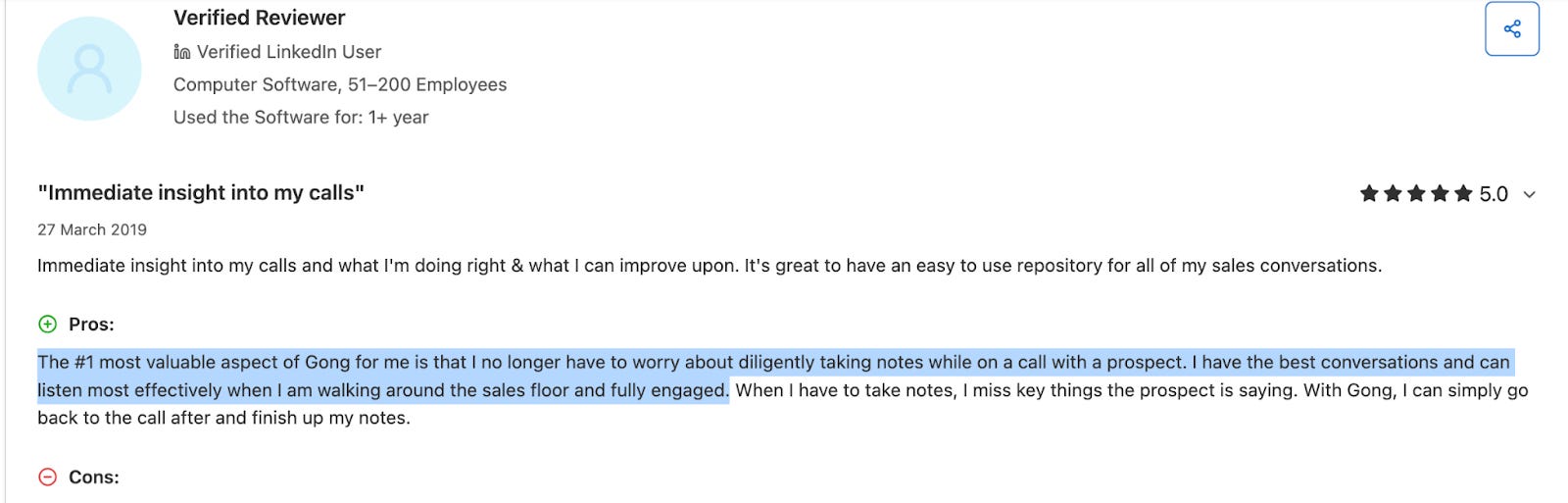
Has been turned into these lines: “The number one benefit is that reps no longer worry about taking notes during calls. They have their best conversations when they can be fully engaged.”
And this review:
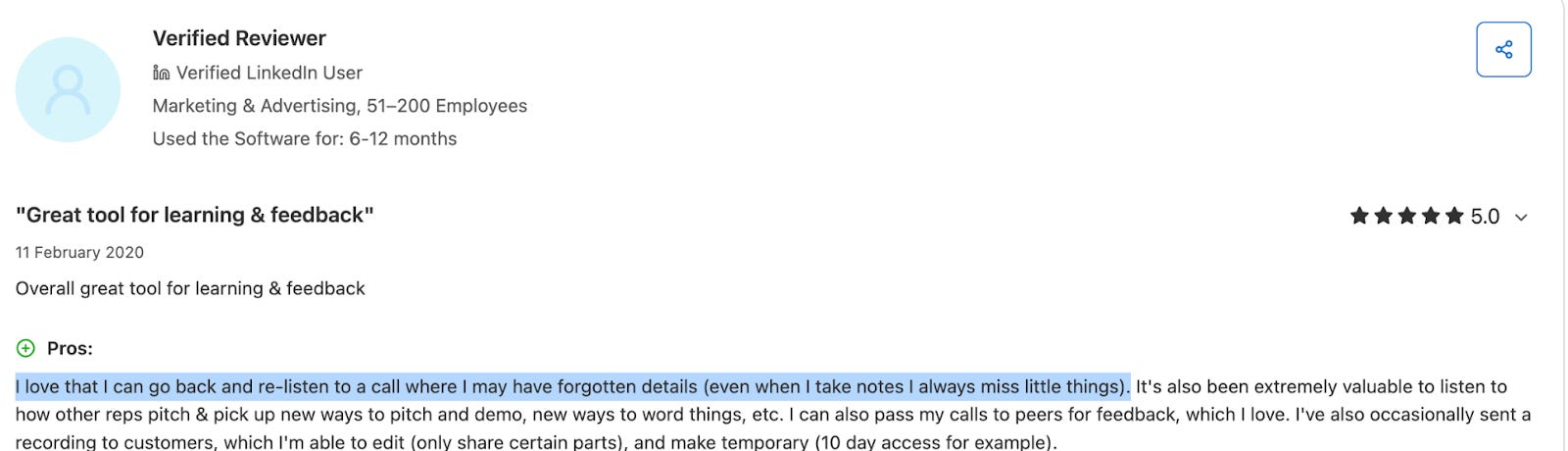
Has inspired these lines: “Teams love that they can go back and listen to calls later. Even when they take notes, they always miss things.”
Not every line of the copy is pulled from reviews but the bits that aren’t, summarize the bits that are. This is a great start, but there are some problems.
The output isn’t perfect
Problem 1: hallucination
LLM hallucination is a well documented problem at this point and it pops up here.
LLMs often make up answers and present them as facts. They are text prediction machines that predict plausible answers rather than 100% accurate ones.
Reading through the copy my initial reaction was the customer quotes were made up. They didn’t read like things customers would actually say. It turns out they weren’t completely made up, just heavily reworded — we’ll need to replace them with real quotes.
Problem 2: writing quality
Using the customer reviews has made the writing a bit stronger but some of it is still a bit weird. Take this FAQ:
Is it hard to set up?
Most teams find it easy to use and set up. You’ll be ready overnight with connections to 250+ tools you already use.
The second sentence feels like it was pulled from a review or the existing homepage and is only slightly related to the question being asked.
Next steps
Conversion research that took weeks now takes hours. The copy isn’t ready to go live, but having a first draft built from hundreds of actual customer reviews is a massive head start.
The real breakthrough for me isn’t that AI can write copy, write code, etc. It’s that I can apply it to my existing processes and make them much quicker. I still sift through the reviews and refine the copy but the heavy lifting is done.
In my next post (link here), I’ll show you how to fix the hallucinations and awkward phrasing, then turn the finished copy into a working HTML page.